On-prem GenAI deployment: when it's right and how to start
On-prem GenAI deployment is the right call when regulated data cannot leave your perimeter, latency to internal systems matters, or your token volume is high enough that cloud API costs compound faster than a capital investment. If none of those three apply, a VPC-isolated cloud endpoint is usually the pragmatic choice. For organisations that meet the bar, the immediate next step is not a full production build. It’s a gated proof of concept behind an OpenAI-compatible gateway with SSO and audit logging switched on from day one.
Expect three outcomes from that path:
Full control over data residency and model behavior, with no third-party retention policy to trust
The freedom to customise or fine-tune models without vendor lock-in
A heavier operational burden that your team must staff for, not bolt on later
On sustained, high-volume workloads, on-prem deployment can undercut cloud API costs over time despite the upfront hardware spend. The break-even point depends entirely on your token volume, which is why sizing the POC honestly matters more than sizing the eventual cluster.
Key Takeaways
On-prem GenAI deployment succeeds when data control, latency, and sustained volume justify the capital cost, and when a gateway-first architecture makes the system auditable from day one.
Point | Details |
Start with a gated POC | Deploy behind an OpenAI-compatible gateway with SSO and audit logging before scaling hardware. |
Size GPUs to the model | A 70B model like Llama 3.1 70B typically needs 40 to 80GB of VRAM depending on quantisation. |
Treat the gateway as the compliance layer | Centralise authentication, routing, and audit logging there regardless of serving engine. |
Budget beyond hardware | Include spare parts, model refresh cycles, and procurement lead time in TCO planning. |
Partner for delivery continuity | Sentient Concepts runs strategy, engineering, and managed operations under one accountable team, closing the handoff gaps that stall in-house on-prem projects. |
Table of Contents
Why enterprises choose on-prem GenAI over cloud APIs
Boards don’t approve on-prem AI budgets because it’s fashionable. They approve it because a compliance officer has flagged that customer records, medical files, or trading data cannot legally transit a third-party API, full stop. On-premises GenAI keeps sensitive data inside your own environment while still letting you customise models to your domain vocabulary and workflows, something a shared public endpoint won’t offer at the same depth.
Latency is the second driver, and it’s underrated. When a model needs to query an internal document store, a claims database, or a manufacturing execution system on every inference call, round-tripping to a public cloud region adds delay that compounds across thousands of daily requests. Running the model in the same data centre as the source system removes that hop entirely.
Three factors typically justify the on-prem decision:
Regulatory scope: data residency rules, sector-specific mandates, or contractual clauses that bar external processing
Integration depth: workflows that call the model dozens of times per transaction, where network latency multiplies
Long-run economics: token volumes high enough that per-call cloud pricing exceeds amortised hardware costs
Not every regulated workload needs full on-prem, though. A decision-tree approach that treats SaaS APIs, VPC-isolated endpoints, and full on-prem as a spectrum, not a binary, will save you from over-engineering. If a private endpoint inside your own cloud tenancy satisfies the auditors, that’s less operational weight than racking GPUs.
Core infrastructure: GPU, storage, networking and platform stack
Your infrastructure list starts with GPUs, and the sizing question is really a VRAM question. A 7 to 8 billion parameter model quantised to 4-bit runs comfortably on a single 24GB card. A 70 billion parameter model like Llama 3.1 70B, which offers a strong balance of quality and running cost for enterprise use, needs somewhere between 40GB and 80GB of VRAM depending on quantisation, meaning at minimum a single A100 or H100, or two smaller cards pooled together.
Beyond the GPU, five components round out the stack:
NVMe storage for model weights and fast checkpoint loading. Model files for a 70B model can run to 140GB or more unquantised, so plan storage headroom, not just capacity for today’s model.
Backup infrastructure for weights, fine-tuned adapters, and configuration state. Losing a fine-tune to a failed disk is an expensive way to relearn version control.
Networking with enough east-west bandwidth between GPU nodes if you’re running tensor parallelism across cards. A single 10GbE link between nodes will bottleneck a multi-GPU inference cluster.
Rack power and cooling headroom. A single H100 draws around 700W under load; a four-card node pushes your rack’s power and cooling budget in ways a standard server closet won’t handle.
Procurement lead time, which for enterprise-grade GPUs can run into months rather than weeks, so order before your POC concludes if the pilot looks promising.
On the software side, start simple: Ollama gets a model serving in under an hour and is fine for a proof of concept or low-concurrency internal tool. When you need to serve dozens of simultaneous users with acceptable latency, migrate to vLLM or a containerised serving layer with continuous batching, which handles concurrent requests far more efficiently than a single-request-at-a-time setup ever will.
Deployment patterns: from single node to air-gapped production
Match the architecture to your risk profile, not to what looks impressive in a slide deck. Four patterns cover most enterprise scenarios:
Single-node prototype: one workstation or server with one to two GPUs, running an OpenAI-compatible endpoint. Sufficient for evaluating model quality and building internal buy-in before you spend on a cluster.
Clustered production: multiple GPU nodes behind a load balancer, often orchestrated with Kubernetes. This adds real complexity, health checks, GPU scheduling, node affinity, so only move here once concurrency genuinely demands it.
Air-gapped deployment: for environments with no external network access, which requires pre-staging model weights and container images onto physical media before transfer, plus a plan for how you’ll patch and update without internet access.
Hybrid VPC pattern: model runs on-prem, but orchestration, monitoring, and CI/CD tooling live in a private cloud tenancy. This suits teams that want on-prem inference without also running their own Kubernetes control plane.
Whichever pattern you choose, the gateway sits in front of all of them. Treat it as your compliance control plane: the single place where authentication, request routing, policy enforcement, and audit logging converge, regardless of which serving engine sits behind it.
Pro Tip: Build the gateway before you build the cluster. Retrofitting SSO and audit logging onto a system already in production use is far more disruptive than adding a capacity node later.
Security, governance and compliance controls that pass an audit
Auditors don’t accept “we run it ourselves” as a control; they expect enterprise AI security with rigorous controls and governance in place. They want specifics, and five areas cover what most enterprise security reviews will ask for:
Network segmentation: isolate GPU inference nodes on their own VLAN, with explicit firewall rules governing which internal systems can reach the model endpoint. Treat the model server like any other sensitive data store, not a general-purpose application.
Key management: use a hardware security module or equivalent for encryption keys protecting model weights at rest and data in transit. This matters more than it sounds; a stolen fine-tuned model can leak proprietary training data.
Gateway-level auditing: log every request and response, including user identity, timestamp, and token counts. Decide your retention period against your regulatory obligations, and build a prompt redaction policy for anything containing personal data before it hits long-term storage.
Identity controls: enforce SSO for human users and distinct service accounts for system integrations, with role-based access controls governing who can query which models. Feed these logs into your existing SIEM rather than building a parallel monitoring stack.
Jurisdictional review: have legal counsel confirm which specific regulations apply to your deployment and data flows. Cross-border data rules vary enormously by sector and country, and assuming your on-prem setup automatically satisfies every regime is a costly mistake.
The gateway is not a nice-to-have bolted on for compliance theatre. It’s the only point in the entire stack where you can prove, after the fact, exactly who asked the model what, and what it answered.
This kind of practical, per-request audit trail is precisely what turns a technically sound deployment into one that security and legal teams will actually sign off.
Cost and TCO: when on-prem breaks even against cloud APIs
Capital costs front-load hard: a multi-GPU node with enterprise support can involve substantial upfront capital before you’ve served a single production request. Recurring costs, power, cooling, and the engineering time to keep it patched, add up quietly but consistently.
The comparison that matters is against sustained token consumption on cloud APIs. On-prem can save meaningfully on total cost of ownership for high, steady volumes, because cloud providers charge per token indefinitely while your hardware cost is fixed once purchased. The break-even point moves earlier the higher your daily volume climbs, and later if your usage is bursty or seasonal.
Three cost categories get missed in early budgeting:
Spare parts and hardware refresh, since GPUs fail and enterprise support contracts aren’t free
Model update cycles, as newer open models often outperform what you deployed a year ago, meaning re-evaluation work
Procurement lead time risk, where ordering too late delays your go-live by months
If your team lacks deep MLOps bench strength, managed self-hosting arrangements can close that gap, trading a premium over pure DIY for meaningfully lower operational risk.
Running GenAI on-prem: MLOps, monitoring and runbooks
A model in production without a runbook is a liability waiting for an incident. Four operational disciplines separate a stable deployment from a fragile one:
Runbooks covering restart procedures, rollback steps for a bad model version, and an incident escalation path with named owners, not just a wiki page nobody has read.
Monitoring that exports GPU utilisation, queue depth, tokens per second, and end-to-end latency to your existing observability stack, not a bespoke dashboard only one engineer understands.
Safe rollout practices, using canary or blue-green deployment for new model versions, with a defined testing cadence before anything reaches full traffic.
Governance, with a named owner for model update approval and a periodic revalidation schedule, since model drift and prompt injection risks change over time even when the underlying weights don’t.
Pro Tip: Export tokens-per-second and queue depth from day one, even in the POC. It’s the single fastest way to spot when you need a second GPU node before users start complaining.
Building an operating model with clear ownership for these decisions prevents the common failure mode where a successful pilot stalls because nobody was assigned to own it past launch.
Why Sentient Concepts is built for on-prem GenAI delivery
Sentient Concepts runs the full lifecycle, strategy, engineering, and ongoing operations, under one accountable team, so nothing gets lost in a handoff between the firm that designed your architecture and the one left to run it.
Deep MLOps discipline reduces the operational risk that catches most in-house teams off guard
Finance, manufacturing, and logistics experience means faster, better-informed model and infrastructure sizing
One team owns delivery from assessment through to managed operations, with no continuity gap
Data preparation and management for on-prem GenAI
On-prem GenAI lives or dies by how well you’ve prepared the data feeding it, and that work looks different from a cloud pipeline. Your fine-tuning corpus, retrieval index, and evaluation sets all need to sit on infrastructure inside the same trust boundary as the model itself, which usually means building an internal data lake or document store rather than piping data through an external vector database service.

Start with a data inventory: what internal documents, transaction logs, or knowledge bases will feed retrieval-augmented generation, and which of those contain personally identifiable or regulated information that needs masking before indexing. Redaction and classification should happen before data reaches the vector store, not as an afterthought once retrieval is already live.
Versioning matters as much for data as for model weights. If your retrieval index changes weekly as documents update, you need a way to reproduce what the model “knew” at any given point, particularly if outputs ever face regulatory scrutiny. A simple timestamped snapshot policy for your vector index solves most of this without needing exotic tooling.
Data quality also drives model behaviour more than most teams expect. A retrieval corpus full of outdated policy documents or duplicate records degrades answer quality just as much as an under-sized model does, and it’s a cheaper problem to fix. Building this pipeline properly, with proper platform engineering underneath it, is usually the difference between a POC that impresses stakeholders and one that quietly embarrasses them three months later.
Planning for scale and future-proofing your deployment
The GPU cluster you provision for a 50-user pilot will not serve 2,000 users, and pretending otherwise leads to painful mid-project rearchitecting. Plan capacity in stages: pilot, departmental rollout, and enterprise-wide, with a clear trigger for when you move between them, such as sustained queue depth or latency breaching your service level target.
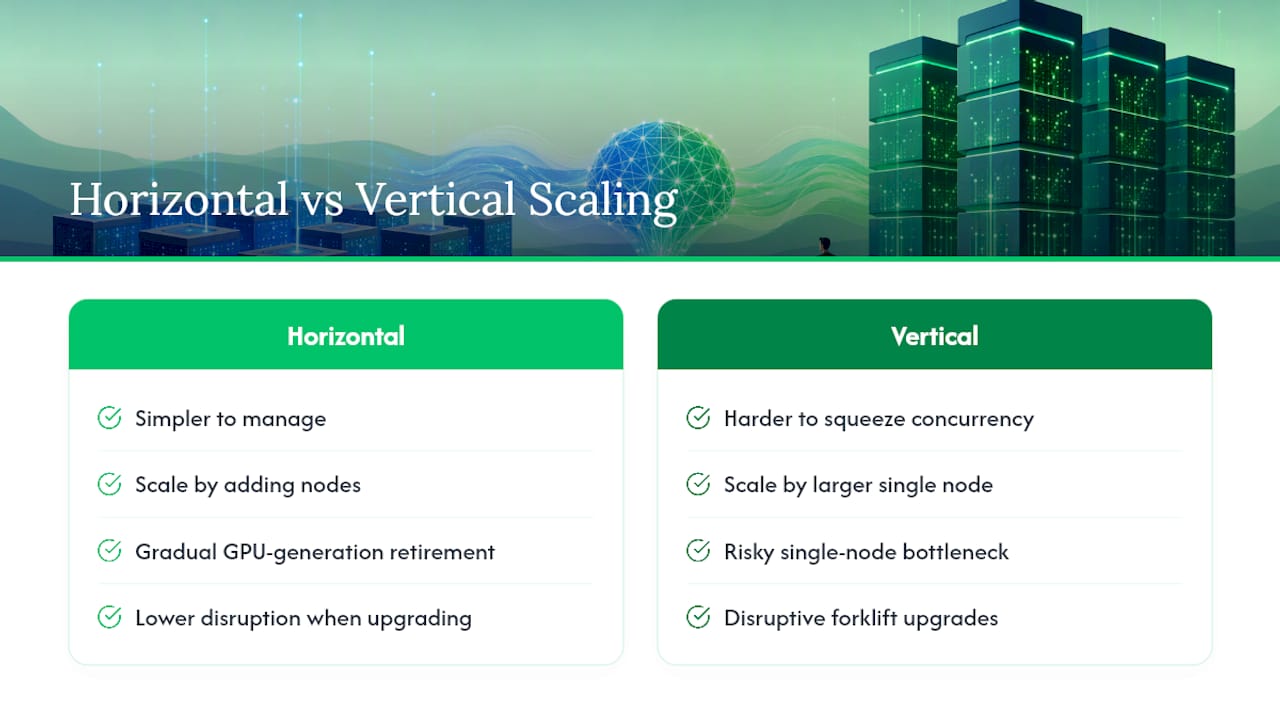
Horizontal scaling, adding more GPU nodes behind your load balancer, is usually simpler to manage than trying to squeeze more concurrency out of a single oversized node. It also gives you a natural upgrade path: retire older GPU generations from the pool gradually rather than doing a disruptive forklift replacement every few years.
Future-proofing also means architecting so the model itself is replaceable. Open-weight models improve quickly, and a deployment tightly coupled to one specific model’s quirks makes swapping in a better one painful. Keeping your gateway and serving layer model-agnostic, so a new model just needs a config change rather than a rebuild, protects your investment as the open-model ecosystem moves forward.
Finally, budget headroom for demand you haven’t anticipated yet. Successful internal AI tools tend to spread by word of mouth faster than IT teams expect, and a deployment that’s technically solid but capacity-starved damages trust in the whole initiative just as much as one that never launches. A sound architecture anticipates this growth curve rather than reacting to it after the fact.
Hardware maintenance and lifecycle management
GPUs are not fit-and-forget hardware. Enterprise cards typically carry a three to five year support window, and planning your refresh cycle before hardware ages out avoids scrambling for replacement parts on a discontinued model line.

Build a maintenance calendar covering firmware updates, driver patching, and thermal inspection, since GPU throttling from inadequate cooling is a common, quietly degrading failure mode that shows up as slower inference long before it shows up as an outage. Track utilisation and temperature trends over time rather than only reacting to alerts.
Spare capacity matters more here than in typical enterprise IT. A failed GPU in a four-card inference node doesn’t just reduce capacity proportionally, it can take the entire node offline if your serving software isn’t configured to gracefully degrade. Keep at least one spare card on-site or under a rapid-replacement support contract if your deployment supports anything business-critical.
Plan your refresh cycle against model requirements too, not just hardware age. If next year’s leading open-weight model needs meaningfully more VRAM than this year’s, your hardware lifecycle and your model roadmap need to be planned together, not treated as separate budget lines that occasionally collide.
How to evaluate vendors and technology for on-prem GenAI
Vendor evaluation for on-prem GenAI should weight four criteria above marketing claims: hardware compatibility, serving software maturity, support model, and integration depth with your existing enterprise stack.
Hardware compatibility means confirming a vendor’s reference architecture actually matches GPUs you can procure at reasonable lead times, not a card that’s perpetually backordered. Serving software maturity matters because the gap between Ollama and vLLM, or between a hobbyist container and a hardened enterprise serving stack, shows up the moment you have real concurrent load.
Support model deserves scrutiny too: does the vendor offer response times that match your operational tolerance for downtime, and do they have real experience with air-gapped or highly regulated environments, not just cloud deployments retrofitted for on-prem messaging. Finally, weigh integration depth. A model server that can’t cleanly plug into your existing SIEM, identity provider, and monitoring stack will cost you more in custom glue code than any licence fee saves you.
Cloud ML platform comparisons are worth studying even if you land on-prem, because the trade-offs Vertex AI, SageMaker and Azure ML make around managed observability and integration illustrate exactly what you’ll need to build yourself on-prem, and where a hybrid VPC approach might genuinely be less work.
What the on-prem hype gets wrong
Most on-prem GenAI advice treats it as purely a technical migration: swap the API endpoint, rack some GPUs, done. That framing undersells the real challenge, which is organisational, not architectural. The teams that succeed treat the gateway, not the model, as the centre of the project, because the gateway is what makes the system defensible to auditors, legal counsel, and your own security function months after launch.
The conventional advice also underweights operations. Plenty of proof of concepts run beautifully on a single workstation and then die quietly because nobody budgeted engineering time for monitoring, rollback, or model refresh cycles. A model in production without a named owner is not a deployment, it’s a ticking incident.
If there’s one priority worth insisting on before anything else, it’s this: build the audit trail before you scale the cluster. Capacity is a solvable problem you can fix with a purchase order. A missing compliance record from month one, when the auditors eventually ask, is not.
— Thomas Samuel
Get an on-prem GenAI deployment built with continuity, not handoffs
Sentient Concepts is the alternative to piecing together your on-prem stack across separate hardware vendors, integrators, and MLOps contractors. Where those routes hand your project between three or four different teams, Sentient Concepts runs strategy, engineering, and ongoing operations under one accountable team from the first architecture decision through years of production support.
That continuity matters most in exactly the areas this article has covered: gateway design, audit logging, GPU sizing, and the runbooks that keep a deployment stable after launch. Sentient Concepts brings tested experience in finance, manufacturing, and logistics, sectors where compliance requirements and integration depth make on-prem GenAI genuinely difficult to get right on a first attempt.
If your organisation has already concluded that on-prem is the right call, the next step is a readiness assessment to confirm your data, infrastructure, and compliance requirements before committing capital. Start with Sentient Concepts’ AI strategy and roadmap service to scope a proof of concept sized correctly for your organisation from day one.
Sources
FAQ
What is an on-prem server for AI?
An on-prem AI server is physical infrastructure, typically GPU-equipped servers with high VRAM capacity, that runs inference and hosts model weights entirely within your own data centre rather than a public cloud region.
What is on-premise AI?
On-premise AI refers to running AI models, including large language models, on infrastructure your organisation owns and controls, keeping data and compute inside your own network perimeter rather than sending requests to an external API.
Which AI is best for on-prem deployment?
There’s no single best model. Llama 3.1 70B is a widely used choice for strong quality-to-cost ratio at enterprise scale, while smaller 7 to 8 billion parameter models suit teams with limited GPU budgets or lower concurrency needs.
What is an on-premise AI agent platform?
It’s a self-hosted stack combining a model serving layer, a gateway for authentication and audit logging, and orchestration tooling that lets AI agents query internal systems and data without any request leaving your own infrastructure.
How does on-prem GenAI deployment compare to Vertex AI or SageMaker?
Vertex AI and SageMaker offer managed infrastructure and faster time to deployment, while on-prem GenAI deployment trades that convenience for full data control and, at high sustained volume, potentially lower long-term costs.
Recommended