Internal helpdesk chatbot for IT managers: pilot playbook
- 3 hours ago
- 12 min read
An internal helpdesk chatbot is a conversational AI agent that connects to your organisation’s own systems — identity directories, ITSM platforms, and knowledge bases — to answer employee IT requests and execute routine tasks without human intervention. The immediate payoff is ticket deflection: agents stop fielding password resets and account unlock requests, and employees get answers at 2 AM without raising a ticket at all. The recommended first move is a focused pilot that automates a defined set of high-volume requests, wires in SSO and Active Directory for identity-aware responses, and tests escalation rules before any broad rollout. Retrieval-augmented generation (RAG) keeps answers grounded in your internal documentation rather than the open internet, which is what separates a genuinely useful service-desk bot from a generic AI assistant.
Key takeaways
A well-scoped internal helpdesk chatbot pilot, built on clean knowledge sources and proper identity integration, can deflect a substantial share of routine IT tickets within a couple of months while cutting mean time to resolution to near-instant for common requests.
Point | Details |
Start with three to five use cases | Password resets, account unlocks, and ticket status checks deliver the fastest measurable deflection with the lowest risk. |
Integration readiness is the gate | SSO, Active Directory, and ITSM connectors must be tested with production credentials before the pilot goes live. |
Data quality beats model quality | Assign a named owner to every knowledge source before launch; stale content is the leading cause of bot failure. |
Measure three KPI categories | Track deflection rate, MTTR, and CSAT from week one to build a credible ROI case for scale-up. |
Sentient Concepts accelerates delivery | Managed pilot-to-scale services cover connectors, governance, and ongoing tuning so internal teams focus on content ownership. |
Table of Contents
What does an internal helpdesk chatbot actually do?
The term “internal helpdesk chatbot” is widely used, but the industry standard label is service-desk conversational agent or IT virtual agent. Whatever the label, the function is the same: a bot that sits inside your employees’ existing communication channels, understands who is asking, queries your internal systems, and either answers or acts.
Core capabilities typically include knowledge-base retrieval, ticket triage and status checks, password resets, account unlocks, access provisioning, guided troubleshooting, and onboarding checklist actions. The IT helpdesk agent scenario published in Microsoft’s Copilot Scenario Library walks through exactly this scope, including how the agent checks ticket status, answers policy questions, and escalates to a human when confidence is low.
What separates this from a customer-facing chatbot is access and accountability. A customer bot answers questions about public products. An internal agent authenticates the requester via SSO, checks their role and permissions in Active Directory, queries a live ITSM like ServiceNow or Jira Service Management, and can execute actions on behalf of a verified employee. That access demands stricter governance: every action must be logged, every sensitive operation must require explicit approval, and the bot must never expose one employee’s data to another.
Which IT requests should you automate first?
Not every IT request is equal. The highest-return automations share two properties: they are high-volume and low-risk. Start there, prove value quickly, and expand.
Password resets and account unlocks. These are the single most common IT requests in most organisations. Connecting to Active Directory or Okta lets the bot verify identity and trigger the reset without agent involvement. Microsoft 365 admin documentation covers the tenant APIs that make this automatable at scale.
Ticket status checks. Employees asking “where is my request?” account for a disproportionate share of inbound volume. A connector to your ITSM surfaces the live status in seconds.
Simple access provisioning. Requests for standard software licences or shared mailbox access can follow a pre-approved workflow. Flag anything that grants elevated privileges for human review.
Knowledge-base Q&A. Policy questions, VPN setup guides, and software installation instructions are ideal for RAG-based retrieval over your internal documentation.
Onboarding checklist actions. New starters generate a predictable burst of repetitive requests. Automating checklist steps (laptop setup, system access, benefits enrolment links) reduces the load on both IT and HR.
Risk notes matter here. Password resets require multi-factor verification before execution. Access provisioning for anything beyond standard entitlements must route to an approver. Ticket creation and status checks carry minimal risk and are good candidates for full automation from day one.
Pro Tip: Set a confidence threshold for every answer the bot gives. This single rule prevents the majority of user-trust failures in early pilots.
How does the technical architecture fit together?
A service-desk agent is not a single product. It is a stack of components that must work together, and understanding each layer is what separates a successful deployment from an expensive proof of concept.
Layer | Component examples | What it does |
User interface | Microsoft Teams, Slack, intranet web widget | Where employees interact with the bot |
Conversational layer | RAG-enabled LLM, intent classifier | Understands the request, retrieves grounded answers |
Identity connector | Azure AD, Okta, LDAP | Authenticates the user, checks role and entitlements |
ITSM connector | ServiceNow, Jira Service Management, Freshservice | Creates, updates, and queries tickets |
Automation engine | Power Automate, Ansible, custom API orchestration | Executes actions (resets, provisioning, notifications) |
Knowledge store | SharePoint, Confluence, internal wikis | Source documents for RAG retrieval |
Logging and audit | SIEM, conversation logs, admin console | Records every interaction for governance and tuning |
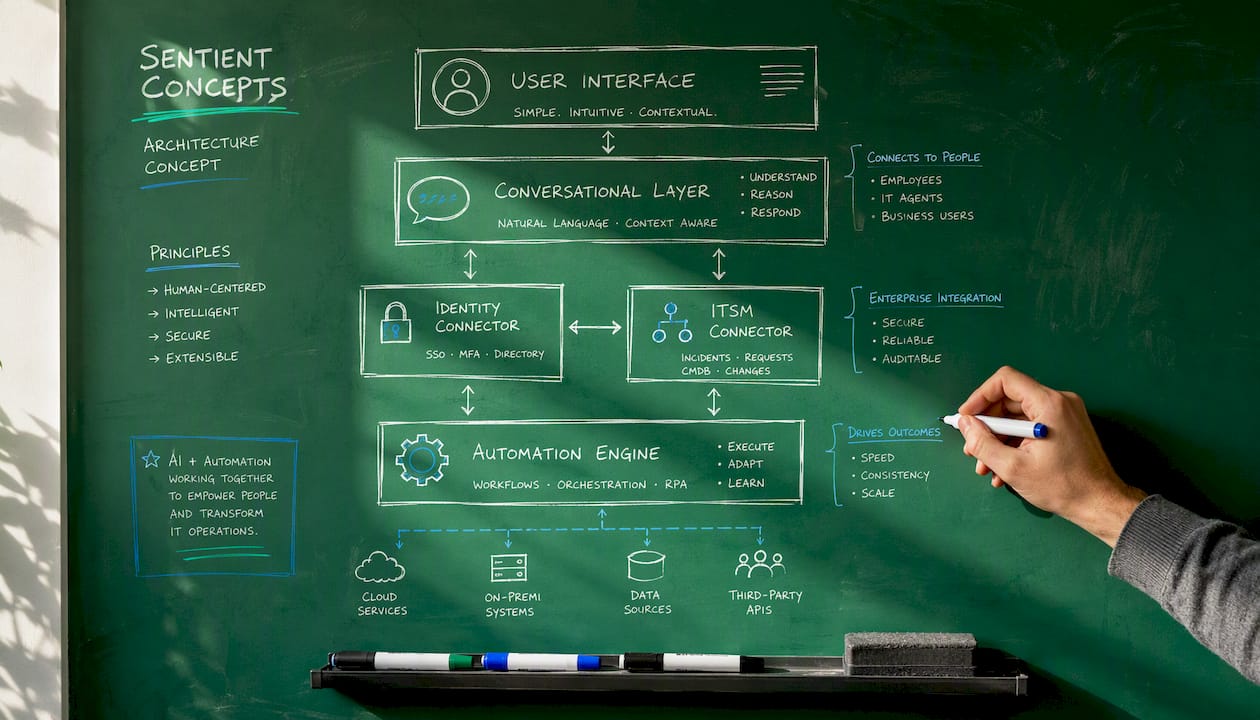
The data flow is straightforward in principle. An employee types a request in Teams. The conversational layer classifies intent and retrieves relevant passages from the knowledge store using RAG, as described in Microsoft’s Copilot documentation. If the request requires an action, the automation engine calls the relevant API under least-privilege credentials. The result is returned to the employee, and the full interaction is written to the audit log.
Architectural cautions: never grant the bot standing admin rights. Use scoped service accounts with the minimum permissions each action requires. Audit logs should be write-once and stored separately from the bot’s own data store.
Pro Tip: Deploy the bot inside Teams or Slack from day one, not on a separate portal. Bots that live where employees already work achieve materially higher adoption than ones that require a separate login or URL.
How do you run a pilot and scale it safely?
A pilot that is too broad fails because it tries to solve everything at once. A pilot that is too narrow fails because it never generates enough volume to produce meaningful data. The right scope is three to five high-volume use cases, one communication channel, and a defined employee group of 50–200 people.
Define scope and success metrics (weeks 1–2). Choose your starter use cases, name the employee group, and agree the KPIs before writing a line of configuration. Deflection rate, mean time to resolution (MTTR), and CSAT are the minimum three.
Audit and clean your knowledge sources (weeks 2–3). Assign an owner to every document the bot will retrieve from. Outdated or contradictory content is the most common cause of poor bot accuracy, and it is a data problem, not a model problem.
Connect identity and ITSM (weeks 3–4). SSO and Active Directory integration must be in place before any action-capable flows go live. The M365 Accelerator provides prebuilt connector templates that reduce this integration effort significantly.
Build and test flows for your top use cases (weeks 4–5). Use simulated queries to stress-test intent recognition, confidence thresholds, and escalation triggers. Test edge cases: ambiguous requests, multi-step provisioning, and requests from users with unusual role combinations.
Run the live pilot (weeks 6–8). Deploy to your pilot group. Monitor daily. Do not wait for the end of the pilot to fix obvious gaps.
Evaluate and decide (week 9). If deflection rate exceeds 30% and CSAT holds above pre-bot baseline, the case for scale-up is strong. If either metric misses, diagnose before expanding.
The Cloud Adoption Framework from Microsoft provides governance and architecture guardrails that apply directly to this kind of phased rollout, particularly around operational controls and readiness gates.
What do real deployments teach you?
The gap between a demo and a production deployment is almost always a data and governance problem, not a technology problem. Teams that succeed share a few consistent habits.
Readiness checklist before go-live:
Every knowledge source has a named owner responsible for keeping it current.
All required API connectors have been tested with production credentials, not sandbox accounts.
Escalation contacts are defined for each use-case category, not just a generic “IT team” queue.
Privacy and consent notices have been reviewed by legal or a data protection officer.
The bot has been tested by users outside the build team, including non-technical staff.
Common pitfalls are predictable once you know to look for them. Poor data quality is the most frequent: a bot trained on a SharePoint site full of three-year-old policy documents will confidently give wrong answers. The fix is a pre-launch audit, not a better model. Missing escalation handoffs are the second most common failure: employees who hit a dead end and cannot reach a human quickly lose trust in the bot permanently. The AI Skills Navigator offers role-based learning paths that help developers and administrators build the skills to maintain and tune agents over time, which matters more than the initial build quality.
Iteration cadence should be monthly in the first quarter: review conversation logs, identify the top five failed or low-confidence interactions, and update knowledge or flows accordingly. After the first quarter, a six-week cycle is usually sufficient.
Pro Tip: Assign a named “bot owner” who is not the original developer. This person reviews logs, liaises with knowledge-source owners, and escalates governance concerns. Without a named owner, bots degrade quietly over months.
What security and governance controls are non-negotiable?
Every internal agent touches sensitive employee data and has the ability to execute actions in production systems. The governance bar must be set before the pilot begins, not after an incident.
Role-based access control (RBAC). The bot must only surface information the authenticated user is entitled to see. A junior employee should never receive data about a colleague’s HR record or an admin-level system configuration.
Least-privilege service accounts. Each integration uses a scoped account with only the permissions that specific action requires. A password-reset account should not have the ability to modify group memberships.
Encryption in transit and at rest. All API calls use TLS 1.2 or higher. Conversation logs and retrieved documents are encrypted at rest.
PII redaction in logs. Conversation logs should strip or mask personally identifiable information before storage. Retain the intent and outcome, not the raw employee input verbatim.
Conversation handoff with full context. When the bot escalates to a human agent, it must pass a concise summary of the conversation so the employee does not have to repeat themselves. This is both a user-experience requirement and a governance one: the agent needs context to handle the request correctly.
Retention policies. Define how long conversation logs are kept, who can access them, and under what conditions. Align with your organisation’s data retention schedule.
Regular knowledge-base audits. Schedule quarterly reviews of every document in the retrieval store. Stale content is a governance risk, not just an accuracy one.
For cloud-hosted deployments, the Azure Cloud Adoption Framework provides the operational controls and architecture patterns that satisfy most enterprise governance requirements. Integrate a legal or security review as a formal gate between the pilot and the scale-up phase.
How do you measure whether the bot is working?
KPIs for a service-desk agent fall into three categories: volume impact, speed impact, and experience impact. Track all three from the first week of the pilot.
Volume impact: Deflection rate is the headline metric. It measures the percentage of requests the bot resolves without human involvement. Early pilots in well-scoped deployments typically see deflection rates of 25–40% within the first eight weeks, rising as knowledge quality improves. Ticket volume by category tells you which use cases are being absorbed and which are still reaching agents.
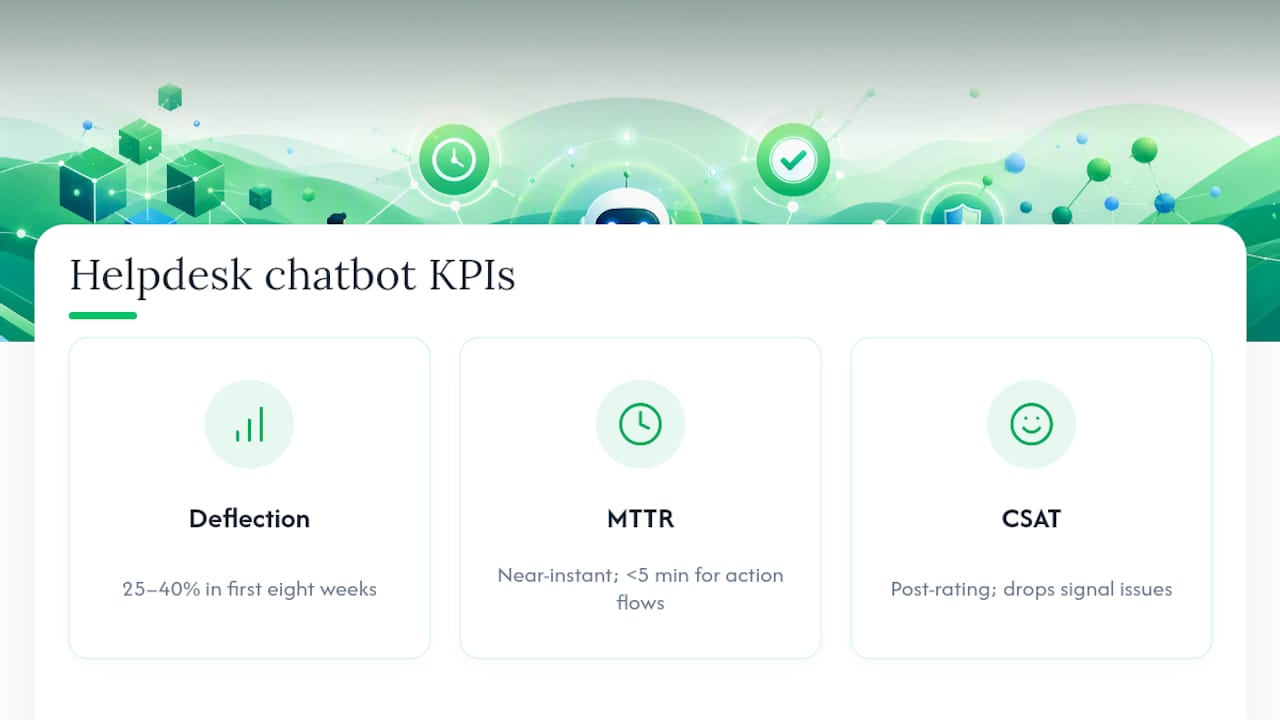
Speed impact: MTTR for bot-handled requests should be near-instant for simple queries and under five minutes for action-based flows like password resets. Compare this to the pre-bot baseline for the same request types. Agent handle-time saved is the metric that translates most directly into cost savings: multiply average handle time by the number of deflected tickets and the blended agent hourly cost.
Experience impact: CSAT for self-service interactions, measured via a simple post-interaction rating, tells you whether employees trust the bot’s answers. A deflection rate that climbs while CSAT falls is a warning sign: the bot is closing tickets it should not be closing.
A simple ROI calculation: (deflected tickets × average handle time in hours × agent hourly cost) minus (platform licence fees + integration effort amortised over 12 months). Include the cost of the initial knowledge-base audit and ongoing tuning in the denominator. For contact centre automation contexts, the same formula applies with the addition of out-of-hours coverage value.
Gartner’s enterprise conversational AI platform reviews provide benchmark data for deflection rates and CSAT scores across vendor categories, which is useful when setting realistic targets for stakeholder presentations.
What should you look for when evaluating platforms or partners?
Shortlisting is faster when you evaluate against a fixed set of criteria rather than vendor feature lists. Use these questions in your RFP or demo script.
Integration depth. Does the platform offer native connectors for your identity provider (Azure AD, Okta), your ITSM (ServiceNow, Jira), and your communication channel (Teams, Slack)? Custom connectors add cost and delay.
Security certifications. What compliance certifications does the vendor hold (ISO 27001, SOC 2 Type II)? Where is conversation data hosted, and can it be restricted to your preferred region?
Escalation quality. How does the platform handle handoffs? Does it pass conversation context to the human agent, or does the employee start from scratch?
Admin tooling for non-engineers. Can a knowledge-base owner update content and retrain flows without raising a development ticket? Platforms that require developer involvement for every update create a maintenance bottleneck.
Custom workflow and orchestration support. Can the platform execute multi-step workflows (e.g. verify identity, check entitlement, provision access, notify manager) or only answer questions?
SLAs and support model. What uptime is guaranteed? What is the vendor’s response time for production incidents?
Pricing model. Is pricing per conversation, per user, or per resolution? Per-resolution pricing aligns vendor incentives with yours; per-conversation pricing can inflate costs as volume grows.
For small pilots, prioritise integration depth and admin tooling. For enterprise rollouts, add security certifications, data-residency controls, and SLA rigour to the top of the scoring matrix. Gartner’s market reviews are a practical starting point for comparing vendor capabilities against these criteria before issuing an RFP.
The trade-off most IT leaders underestimate
The build-versus-buy debate for internal agents is usually framed around cost. That is the wrong frame. The real question is: where does your team’s time go after the pilot ends?
Building in-house gives you control over every connector and every prompt. What it does not give you is a team that is already doing this at scale. Integration work with Active Directory, ServiceNow, and Teams is not technically exotic, but it is time-consuming, and the maintenance burden compounds quietly. Every policy document that changes, every API version that updates, every new use case that gets added requires someone to own it. Without a named internal owner and a clear governance loop, bots degrade within six months of launch.
A managed partner shortens time to value in two specific ways: pre-built connectors that have already been tested against production environments, and an operating model that includes ongoing tuning as a defined deliverable rather than an afterthought. The agentic AI readiness guidance published by Sentient Concepts is worth reading before committing to either path, particularly the section on operational controls and ownership models.
Where internal teams should retain control: the knowledge-base content itself. No external partner can own your policies, your procedures, or your institutional knowledge. That content ownership must stay internal, regardless of who builds and operates the bot.
Sentient Concepts: managed pilot-to-scale for internal AI agents
Organisations that move fastest on internal helpdesk automation share one trait: they do not try to build integration capacity from scratch while simultaneously running a live pilot. Sentient Concepts delivers managed AI operations that cover the full arc from pilot design through to production operations, including identity and ITSM connector setup, knowledge-base structuring, escalation model design, and ongoing optimisation after go-live.
The engagement model is built around the steps this article describes: scoped pilot first, governance gates before scale-up, and a named operating team that owns tuning and knowledge audits on a defined cadence. For organisations without internal integration capacity, or those that need to demonstrate value to stakeholders within a single quarter, a managed partner removes the bottleneck that most in-house pilots hit at the connector and governance stage. The ongoing optimisation service ensures the bot does not degrade after the initial build. To discuss a scoped pilot for your organisation, contact the Sentient Concepts team.
Sources
FAQ
What is an internal helpdesk chatbot?
An internal helpdesk chatbot is a conversational AI agent that connects to your organisation’s identity, ITSM, and knowledge systems to answer employee IT requests and execute routine tasks — such as password resets, account unlocks, and ticket status checks — without human intervention.
What types of IT requests can a service-desk bot handle?
Low-risk, high-volume requests are the best fit: password resets, account unlocks, ticket status queries, policy Q&A, simple access provisioning, and onboarding checklist actions. Higher-risk requests, such as elevated-privilege provisioning, should route to a human approver.
Which AI platforms work best for internal IT support?
Enterprise-grade options with native connectors for Active Directory, ServiceNow, and Microsoft Teams include Microsoft Copilot Studio, ServiceNow Virtual Agent, and Atlassian’s virtual service agent. Gartner’s conversational AI platform reviews provide a structured comparison of vendor capabilities for procurement teams.
Can ChatGPT be used as an internal helpdesk bot?
ChatGPT in its standard form has no access to your internal systems, identity directory, or ITSM, so it cannot execute actions or give identity-aware answers. Purpose-built internal agents using retrieval-augmented generation over your own documents and APIs are the appropriate architecture for this use case.
How long does a helpdesk chatbot pilot take?
A well-scoped pilot covering three to five use cases typically runs six to nine weeks: two weeks for scoping and knowledge audit, two weeks for integration and build, and four to five weeks of live operation before evaluation.
Recommended